Checklist for NetScaler (Citrix ADC) CVE-2025-5777 & CVE-2025-6543

On June 17, 2025, Citrix published a security advisory for CVE-2025-5777, followed by CVE-2025-6543 on June 25, 2025. Both are classified as critical and are actively being exploited in the wild.

Current notice: This article covers a specific older NetScaler vulnerability. For a vendor-independent process covering current CVEs, firmware updates and checks for possible compromise, refer to our NetScaler CVE Checklist.

Threat Overview

  • CVE-2025-5777: Critical vulnerability due to improper input validation → leads to memory overread
  • CVE-2025-6543: Enables memory overflow, potentially resulting in DoS or arbitrary code execution → Exploits available !

⚠️ Important: Simply applying the firmware update is not enough. You must manually terminate all active ICA and PCoIP sessions after patching to ensure the vulnerability is fully mitigated.

Continue reading “Checklist for NetScaler (Citrix ADC) CVE-2025-5777 & CVE-2025-6543”

Web Authentication Action in NetScaler

On one of my recent deployments, I needed to set up external access using NetScaler to an internally hosted web application (Grafana).

Grafana is a cross-platform open source application for graphical representation of data from various data sources such as InfluxDB, MySQL, PostgreeSQL, Prometheus and Graphite.

The challenge here was that the customer wanted to pre-install authentication on the NetScaler, but the users were only known to the web application itself.

The question that therefore came to me was:
How can I check the user of the web application if only the web application itself has access to the user data?

I had only used standards like LDAP, RADIUS, CERT, SAML etc. for user authentication on NetScaler, but these were not useful here because the target system should not be changed.

Continue reading “Web Authentication Action in NetScaler”

SAML Authentication between Citrix & Microsoft with Azure MFA

Update to the latest cloud navigation.

As a result of increasing projects, here is a little how-to with the summary of my previous articles. The main points are:

  • Azure AD Seamless Single Sign-On (PTA / PHS)
  • SAML Authentication (Azure AD as IdP & Citrix Gateway as SP)
  • Citrix Federated Authentication Service (FAS)
  • Microsoft Azure Multi-Factor-Authentication with Conditional Access

Requirements

  • Fully working Citrix Virtual Apps and Desktop Environment (StoreFront & DDC Minimum Version 7.9)
  • NetScaler with successful base configuration & activated Enterprise or Platinum license (Minimum Version 12.1 Build 50+ for native workspace app, for browser Minimum Version 11.1)
  • Configured Unified Gateway vServer
  • Internal and external DNS entries for Unified Gateway vServer (e.g. citrix.deyda.net)
  • Certificates for DNS entries (wildcard certificates are the easiest)
  • Existing Azure Tenant with Azure-AD base configuration (Domain, AAD Sync) & activated Azure AD Premium license
  • AD Connect version installed and configured (Minimum Version 1.1.644.0)
  • Firewall release for *.msappproxy.net on port 443
  • Domain administrator credentials for the domains that connected to Azure AD via AD Connect
  • Installed Authenticator App on Test User Mobile Phone
Continue reading “SAML Authentication between Citrix & Microsoft with Azure MFA”

Citrix ADC 101 – Fundamentals

The following is a collection of basic information about Citrix ADC. From licensing, to the most important commands, to the update procedures that can be performed.

General Information

Here is some basic information about Citrix ADC.

Operating System and Architecture

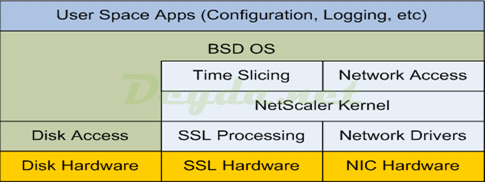
Citrix ADC is based on the open source operating system FreeBSD. Unlike the very similar Linux, FreeBSD has a modular kernel and Citrix has taken advantage of this to modify FreeBSD’s Bash shell by removing the networking subsystem and replacing it with its own. The modifications were placed in a custom kernel module called NetScaler Core Packet Processing Engine (PPE).

Citrix ADC FreeBSD
Continue reading “Citrix ADC 101 – Fundamentals”

ADV190023 – Enable LDAPS in Windows DC and Citrix ADC

Important Info:
The scheduled update (ADV190023), regarding LDAP Signing and Channel Binding for new and existing domain controllers, scheduled for March 10, 2020, has been postponed to the second half of calendar year 2020. The March 2020 update will only provide additional auditing capabilities to identify and configure LDAP systems before they become inaccessible with the later update.

The later update results in no more connections to the domain controller, via unsigned / Clear Text LDAP on port 389. Then it is only possible to use either LDAPS via port 636 or Signed LDAP (StartTLS) on port 389.

Continue reading “ADV190023 – Enable LDAPS in Windows DC and Citrix ADC”