SAML Authentication between Citrix & Microsoft with Azure MFA

Update to the latest cloud navigation.

As a result of increasing projects, here is a little how-to with the summary of my previous articles. The main points are:

  • Azure AD Seamless Single Sign-On (PTA / PHS)
  • SAML Authentication (Azure AD as IdP & Citrix Gateway as SP)
  • Citrix Federated Authentication Service (FAS)
  • Microsoft Azure Multi-Factor-Authentication with Conditional Access

Requirements

  • Fully working Citrix Virtual Apps and Desktop Environment (StoreFront & DDC Minimum Version 7.9)
  • NetScaler with successful base configuration & activated Enterprise or Platinum license (Minimum Version 12.1 Build 50+ for native workspace app, for browser Minimum Version 11.1)
  • Configured Unified Gateway vServer
  • Internal and external DNS entries for Unified Gateway vServer (e.g. citrix.deyda.net)
  • Certificates for DNS entries (wildcard certificates are the easiest)
  • Existing Azure Tenant with Azure-AD base configuration (Domain, AAD Sync) & activated Azure AD Premium license
  • AD Connect version installed and configured (Minimum Version 1.1.644.0)
  • Firewall release for *.msappproxy.net on port 443
  • Domain administrator credentials for the domains that connected to Azure AD via AD Connect
  • Installed Authenticator App on Test User Mobile Phone
Continue reading “SAML Authentication between Citrix & Microsoft with Azure MFA”

Citrix ADC 101 – Fundamentals

The following is a collection of basic information about Citrix ADC. From licensing, to the most important commands, to the update procedures that can be performed.

General Information

Here is some basic information about Citrix ADC.

Operating System and Architecture

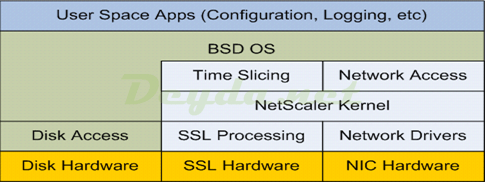
Citrix ADC is based on the open source operating system FreeBSD. Unlike the very similar Linux, FreeBSD has a modular kernel and Citrix has taken advantage of this to modify FreeBSD’s Bash shell by removing the networking subsystem and replacing it with its own. The modifications were placed in a custom kernel module called NetScaler Core Packet Processing Engine (PPE).

Citrix ADC FreeBSD
Continue reading “Citrix ADC 101 – Fundamentals”

ADV190023 – Enable LDAPS in Windows DC and Citrix ADC

Important Info:
The scheduled update (ADV190023), regarding LDAP Signing and Channel Binding for new and existing domain controllers, scheduled for March 10, 2020, has been postponed to the second half of calendar year 2020. The March 2020 update will only provide additional auditing capabilities to identify and configure LDAP systems before they become inaccessible with the later update.

The later update results in no more connections to the domain controller, via unsigned / Clear Text LDAP on port 389. Then it is only possible to use either LDAPS via port 636 or Signed LDAP (StartTLS) on port 389.

Continue reading “ADV190023 – Enable LDAPS in Windows DC and Citrix ADC”

SAML Authentication with Azure AD as IdP and Citrix as SP

Since Citrix XenApp / XenDesktop 7.9 the Federated Authentication Service (FAS) is available. Via Citrix FAS it is possible to authenticate a user via SAML and thus connect Citrix as a service provider to existing identity providers, such as Azure-AD.

Sequence of SAML authentication

  1. The user browse the FQDN (e.g. citrix.deyda.net) of the Citrix Gateway vServer (Service Provider) to start his VA / VD resources
  2. The Citrix Gateway vServer directs the unauthenticated user directly to the Identity Provider (Azure-AD) to authenticate itself (saml: authnRequest)
  3. The Identity Provider points to its SingleSignOnService URL (e.g. login.microsoftonline.com) and the user must authenticate
  4. The user enters his AD credentials and these are checked by the Identity Provider against the user database
  5. Upon successful verification in the user database, the IdP is informed
  6. The IdP issues a token (SAML assertion) and sends it to the Citrix Gateway (saml: response)
  7. Citrix Gateway checks the token (assertion signature) and extracts the UPN from the assertion token. This allows access via SSO to the VA / VD farm via FAS (The SP does not have access to the user’s credentials)
SAML Auth Azure AD & Citrix Gateway with FAS
Continue reading “SAML Authentication with Azure AD as IdP and Citrix as SP”

Copy a Citrix ADC configuration to a new machine

In one of my recent projects, I had to build several Citrix ADCs in a new data center. After consultation with the customer, the same services and functions should be configured as in the old data center. The only difference was that the new data center should use different IP ranges and therefore all network settings of the Citrix ADCs and the connected services had to be adapted.

Requirements

  • Same version and build on all Citrix ADC
  • Same Citrix ADC license version on all Citrix ADC
  • IP addresses of the new Citrix ADC should be defined and free (NSIP, SNIP & VIP).
  • IP addresses of the connected machines should be known (server or server groups)
  • Basic configuration of the new Citrix ADC should be done (NSIP, SNIP, DNS, Timezone & License)
Continue reading “Copy a Citrix ADC configuration to a new machine”