Migration of Citrix databases

With the latest Citrix Virtual Apps & Desktops (CVAD) LTSR version, older SQL Server versions have been discontinued. If you want to keep your environment stable and supportable, there is no way around migrating the Citrix databases (site, logging, monitoring) to modern SQL servers (2019/2022). Whether cluster, always on or mirroring – the procedure remains essentially the same. In this article, I will show you step by step how to migrate securely.

1. Prerequisites

  • Complete backups of all Citrix databases
  • Backups/VM snapshots of the delivery controllers (DDCs)
  • New SQL Server (Cluster, Always On or Mirror)
  • Same SQL version on Principal and Mirror
Continue reading “Migration of Citrix databases”

Citrix License Activation Service (LAS): Goodbye License Files

If you’re a Citrix customer and thinking “next week…” right now — understandable. But starting April 15, 2026, file-based Citrix license files will no longer work. This is not a warning; it’s a hard shutdown date.

That means: if you haven’t migrated to LAS by then, you risk real outages (apps, desktops, or features depending on the component and version).

LAS is not a migration of your workloads to the cloud. Your site continues to run on-premises (DDCs, StoreFront, VDAs, etc.).
The only thing that changes is the activation and licensing mechanism.

Continue reading “Citrix License Activation Service (LAS): Goodbye License Files”

Workaround after Remote Assistance Error

After installing the January 2026 Microsoft security updates, Remote Assistance (msra.exe) no longer works on multiple Windows versions. This directly affects Citrix Director Shadowing, as the generated invite files can no longer be opened on patched systems.

The issue is caused by a security hardening related to CVE-2026-20824 – Windows Remote Assistance Security Feature Bypass Vulnerability. While the fix is technically correct from a security perspective, it currently breaks legitimate Remote Assistance workflows in enterprise environments.

Continue reading “Workaround after Remote Assistance Error”

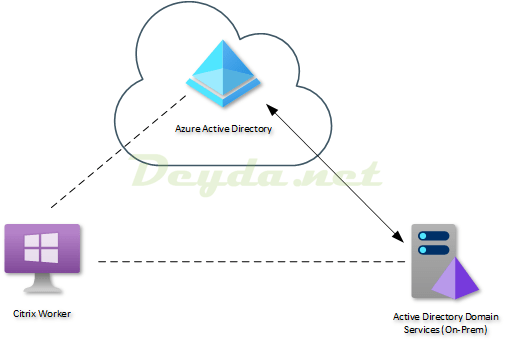
Why a Windows Server 2019 VDI should be Hybrid Azure AD joined

What is Hybrid Azure AD Join ?

Let’s just start with the official definition from the Microsoft documentation:

Hybrid Azure AD Join: Joined to on-premises AD and Azure AD requiring organizational account to sign in to the device.

This means that after the device is Hybrid Azure AD joined, it behaves the same as any other computer connected to Active Directory.

Sign in with an Active Directory account is required.
User credentials are verified against an Active Directory domain controller.
Group Policy objects for users & computers read from the domain controller are applied automatically.

Hybrid Azure AD Join

After the Active Directory connection process is complete, additional steps are performed asynchronously in the background to register the device in Azure AD as well.

Continue reading “Why a Windows Server 2019 VDI should be Hybrid Azure AD joined”

Installing Workspace Environment Management

Workspace Environment Management optimizes Citrix workers for the best possible performance (user density, logon time and application response time).

WEM is subject to the Current Release Lifecycle (Additional Component) and therefore there is no LTSR version of WEM available.

To use WEM, you must have an active Customer Success Services (CSS) for one of the following licenses:

  • Citrix Virtual Apps Advanced
  • Citrix Virtual Apps Premium
  • Citrix Virtual Apps and Desktops Advanced
  • Citrix Virtual Apps and Desktops Premium
  • Citrix Workspace Premium
  • Citrix Workspace Premium Plus

Technical Overview

Workspace Environment Management (WEM) is based on the following architecture:

WEM architecture

Continue reading “Installing Workspace Environment Management”